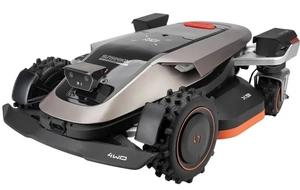
The Most Common Mistakes in Operating Robotic Lawn Mowers That Shorten the Machine's Lifespan
A robotic lawn mower is supposed to be a device that saves you time, keeps your lawn looking perfect, and operates with virtually no maintenance for many years.And indeed—modern models are designed for year-round, heavy-duty use.So why do some devices end up in the repair shop after just a few months of use??In most cases, the problem isn't a hardware defect, but the owner's daily habits.
Minor mistakes in using a robotic lawn mower—such as setting an incorrect schedule, neglecting basic maintenance, or failing to prepare the yard properly—can gradually lead to motor overload, faster battery wear, and electronic malfunctions.It is precisely these kinds of mistakes in operating a robotic lawn mower that are most often responsible for costly repairs that could have been easily avoided.
Good news?Most of them can be eliminated right away.If you want to maximize the lifespan of your robotic lawn mower, keep it in top condition, and avoid unnecessary service visits, check out the most common mistakes made by users of robotic lawn mowers.
Table of Contents:
- Why Do Users Cause More Damage to Robots Than Manufacturers Expect??
- Errors in the Daily Operation of a Lawn Mowing Robot
- Mowing too infrequently – the robot is struggling to cut the tall grass at full capacity
- Cutting height set too low – puts a strain on the engine and damages the lawn
- Improperly scheduled work—working in direct sunlight or after rain
- Ignoring the rain sensor and forcing the mower to operate on wet grass
- Leaving toys, tools, and cords on the lawn
- Errors in preparing the robot's workspace and surroundings
- Errors in the operation of the charging station and the docking process
- Errors in software updates and configuration
- Mistakes Made Between Seasons—in Spring, Fall, and Winter
- "Good-faith" errors—seemingly harmless, but actually costly
Why Do Users Cause More Damage to Robots Than Manufacturers Expect??
Most service calls during the first season are not due to component failures, but rather the result of improper configuration, lack of cleaning, or operating the machine under conditions for which it was not designed.There is a clear difference between a manufacturing defect and a user error.Modern robots are equipped with advanced self-diagnostic systems m.in.They record engine overloads, tests conducted at extreme temperatures, and the level of moisture in the systems. A technician can easily determine whether the damage to the motherboard was caused by a material defect or by high-pressure water flooding the interior..Responsible use is the only way to ensure the longevity of equipment.
Errors in the Daily Operation of a Lawn Mowing Robot
The daily routine of using the equipment in the garden creates the most opportunities for hidden errors to occur, which slowly degrade the mechanical and electronic components.
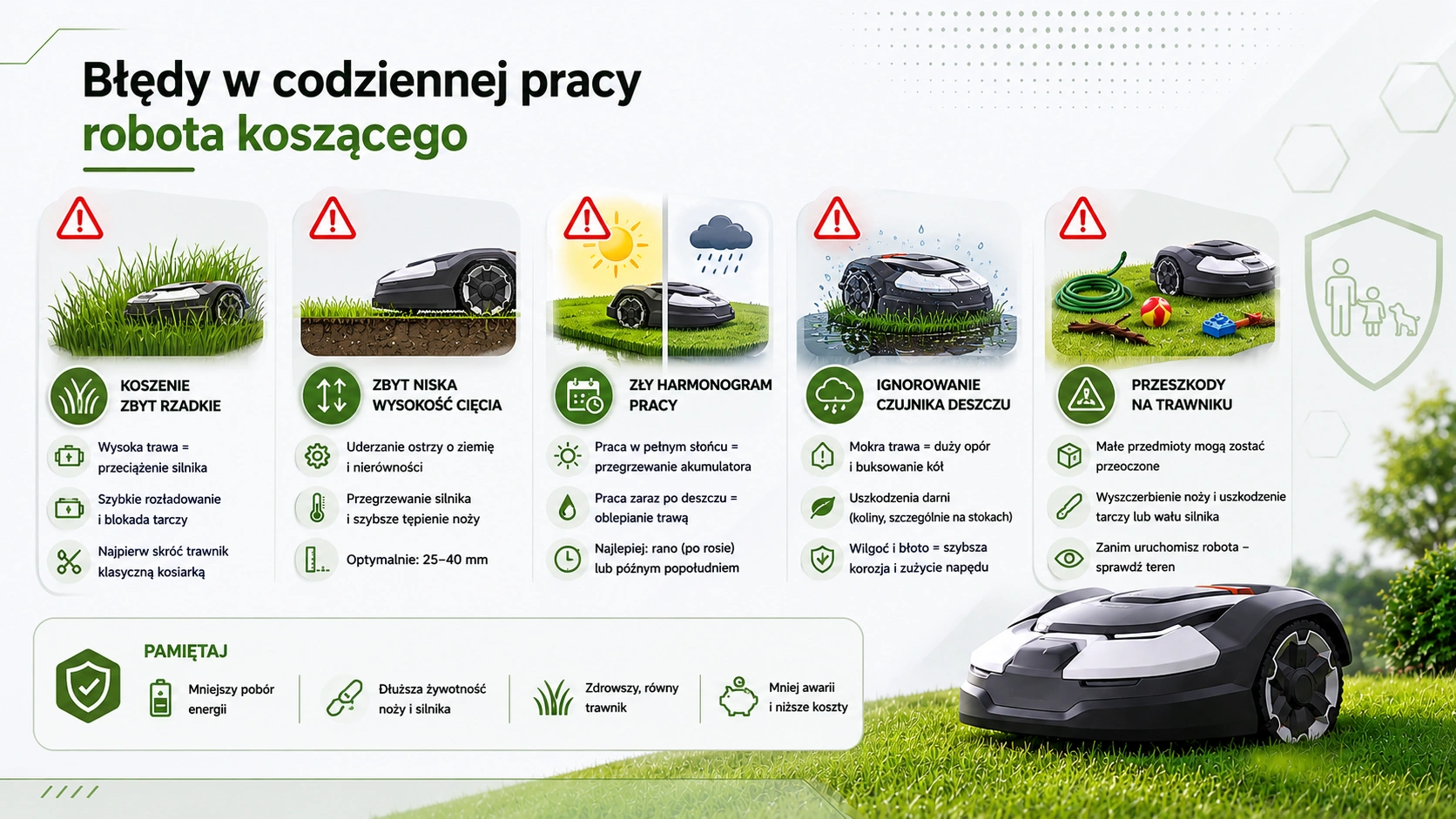
Mowing too infrequently – the robot is struggling to cut the tall grass at full capacity
Robotic lawn mowers operate on a completely different principle than traditional gas-powered mowers.They are designed for frequent (every 1–2 days) cutting of microscopic grass growths measuring a few millimeters (known as mulching).Forcing the robot to mow grass that is 10 cm or taller once a week is a surefire way to overload the cutting motor, drain the battery quickly, and cause the blade disc to jam.
For example.You're back from a two-week vacation, and the grass in the yard is 15 cm tall.Starting the robot directly at its target, low height will cause the machine to jam after a few meters.Instead, start by preparing the lawn by hand—trim the grass using a traditional lawn mower —and only after 1–2 days should you let the robot take over its daily maintenance routine.
Cutting height set too low – puts a strain on the engine and damages the lawn
Sunseeker mowers offer a wide range of cutting height adjustments (e.g., 20–60 mm, or even up to 100 mm on the top-of-the-line models).Setting the minimum value to 20 mm on an uneven lawn is a serious mistake. The blades then begin to strike the hard, woody turf and clumps of earth.This results in a drastic increase in operating resistance, engine overheating, and rapid dulling of the blades.The safe and optimal height for everyday cutting is between 25 and 40 mm.
Improperly scheduled work—working in direct sunlight or after rain
Programming the robot to operate around noon during the summer heat exposes the battery to critical overheating (at temperatures above 40°C, Li-ion cells degrade several times faster)..On the other hand, running the mower during heavy morning dew causes wet grass clippings to stick thickly to the undercarriage, preventing the blades from rotating freely.It's best to schedule watering for the morning (after the dew has dried) or late afternoon.
Ignoring the rain sensor and forcing the mower to operate on wet grass
Many users wonder if it's okay to run a robotic lawn mower on wet grass.Modern models are equipped with built-in rain sensors that, upon detecting rainfall, instruct the machine to return to base.Ignoring these instructions and permanently disabling the sensor in the app is a serious mistake when using a robotic lawn mower. Wet grass offers tremendous resistance; the wheels lose traction and spin, damaging the turf (especially on slopes), and the damp mud clinging to the undercarriage drastically accelerates corrosion of metal parts and puts a strain on the drivetrain.
Leaving toys, tools, and cords on the lawn
Although Sunseeker robots are equipped with advanced obstacle-avoidance systems (including Vision AI cameras), small objects such as discarded garden hoses, thin cables, children’s building blocks, or dog toys may be overlooked.Running over them will immediately chip the blades, and in extreme cases may cause the plastic blade guard to crack or the motor shaft to bend.
Errors in preparing the robot's workspace and surroundings
Even the best robot won't be able to handle the garden if the work area isn't prepared properly.
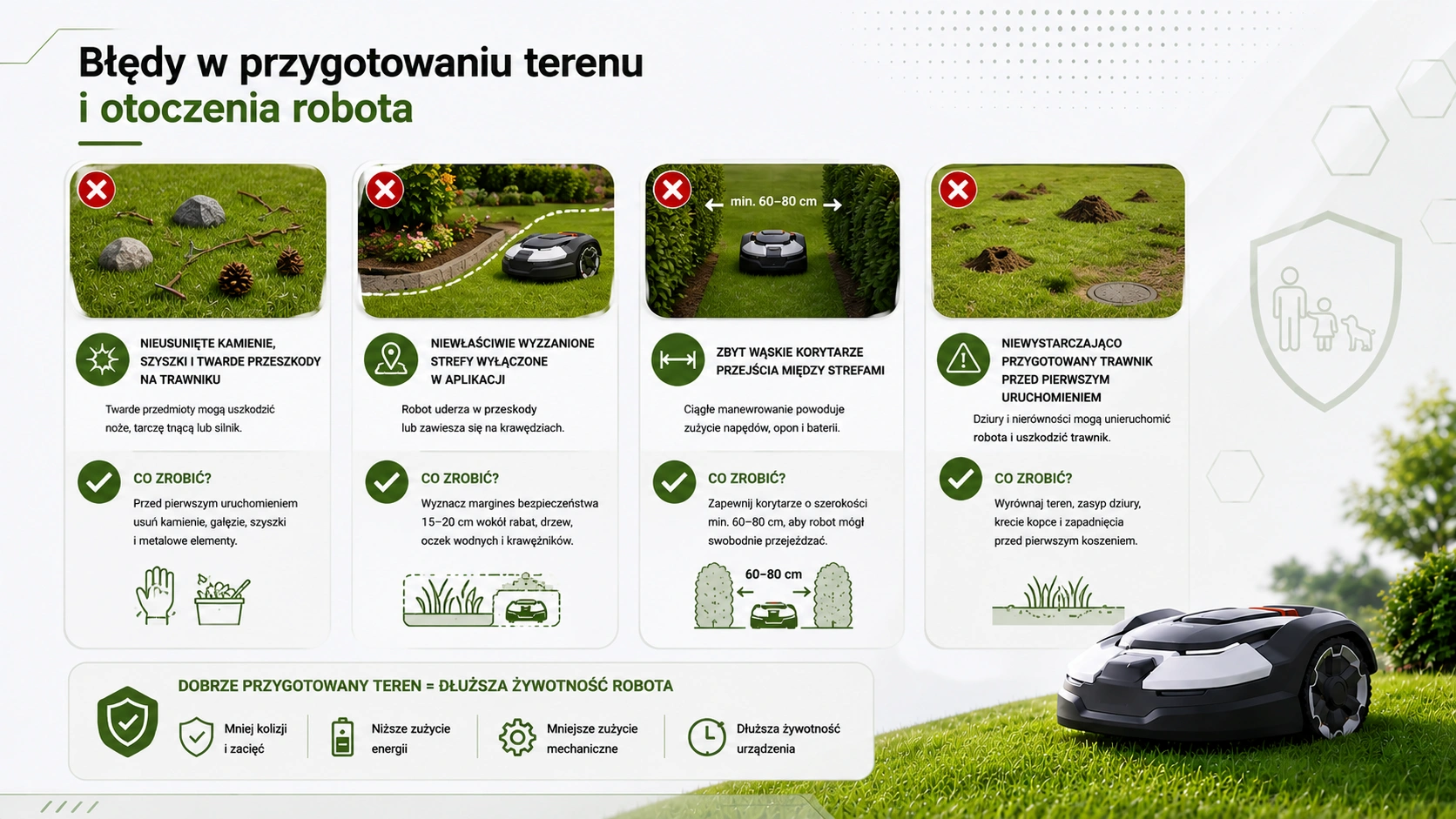
Unremoved rocks, pinecones, and hard objects on the lawn
This is the most common cause of mechanical damage to the cutting system during the first month after purchase.Before starting the mower for the first time this season, it is absolutely essential to thoroughly inspect the lawn, removing fallen branches, hard pinecones, stones, and metal objects.
Incorrectly designated restricted zones in the app
Modern robots use digital mapping.If you set the boundaries around flower beds, protruding tree roots, or ponds too narrowly, the robot will regularly bump its casing against obstacles or get stuck on curbs. Always maintain a safe margin of 15–20 cm.
The passageways between zones are too narrow
An attempt to force a robot to navigate through corridors narrower than 60–80 cm forces the machine to constantly maneuver back and forth. This results in excessive wear on the drive gears, rapid tire tread wear, and unnecessary waste of battery power due to constantly spinning in place.
A lawn that hasn't been properly prepared before the first use
Leaving deep potholes, molehills, or sunken sewer manholes along the route is a surefire way to bring the robot to a standstill.A machine that gets stuck in a hole will try to free itself by spinning its wheels in place, which leads to overloading the drive motors and damaging the turf structure.
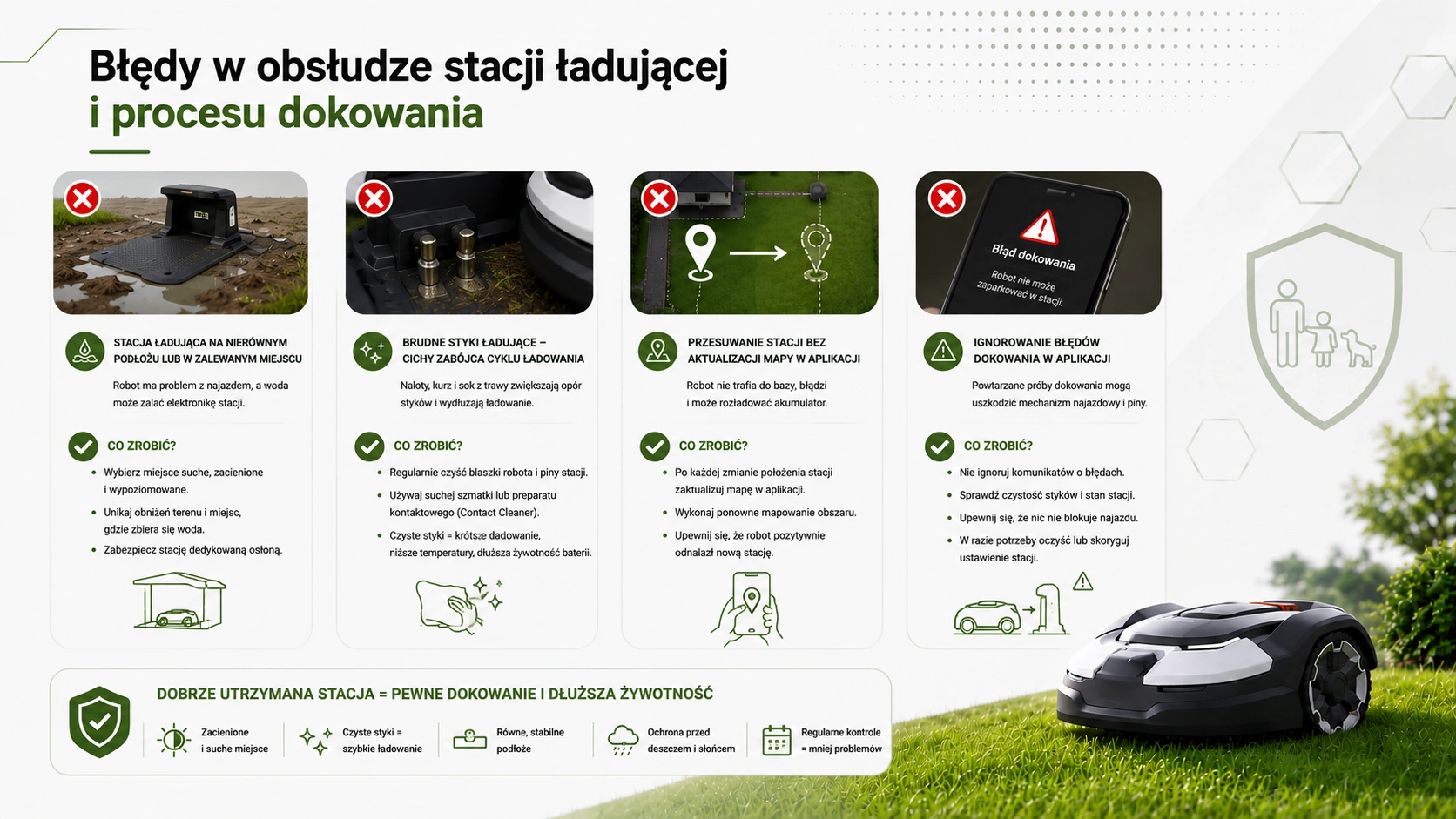
Errors in the operation of the charging station and the docking process
The docking station is your robot's home.That's where he spends most of his time, which is why its proper placement and maintenance are crucial.
A charging station on uneven ground or in a flooded area
If the station's base plate is installed on uneven ground, the robot will consistently have trouble properly aligning with the charging pins.Furthermore, locating the base in a low-lying area where water accumulates after every downpour poses a risk of permanent flooding of the station's lower electronics.The base must be placed in a dry, shaded, and level location.A dedicated cover, such as the Sunseeker X3 / X3 PLUS charging station cover ( ), effectively protects it from the sun and rain. (You can read more about the physics of thermal protection and canopies in our in-depth article on charging station covers.).
Dirty charging contacts—the silent killer of the charging cycle
Over time, both the metal plates on the robot's housing and the pins in the charging station become coated with a layer of oxides, dust, and grass clippings..Dirty contacts drastically increase electrical resistance. As a result, the charging process takes longer, the station gets very hot, and the built-in battery management system (BMS) reduces the current to protect the cells, which the user mistakenly interprets as a battery failure.(For detailed cleaning instructions, see our FAQ on cleaning the robot and sensors).
Moving a station without updating the map in the app
Sunseeker robots rely on advanced RTK satellite navigation and VSLAM technology.If you move the charging station even by a few dozen centimeters (e.g., while doing yard work) without remapping, the robot won't be able to find its way back to the base and will keep circling the lawn until its battery is completely drained.
Ignoring docking errors reported by the application
If the system reports a problem with docking at the base several times, you must not ignore it.Ignoring this message forces the robot to keep trying to dock, which damages the docking mechanism and may cause the contact pins to bend.
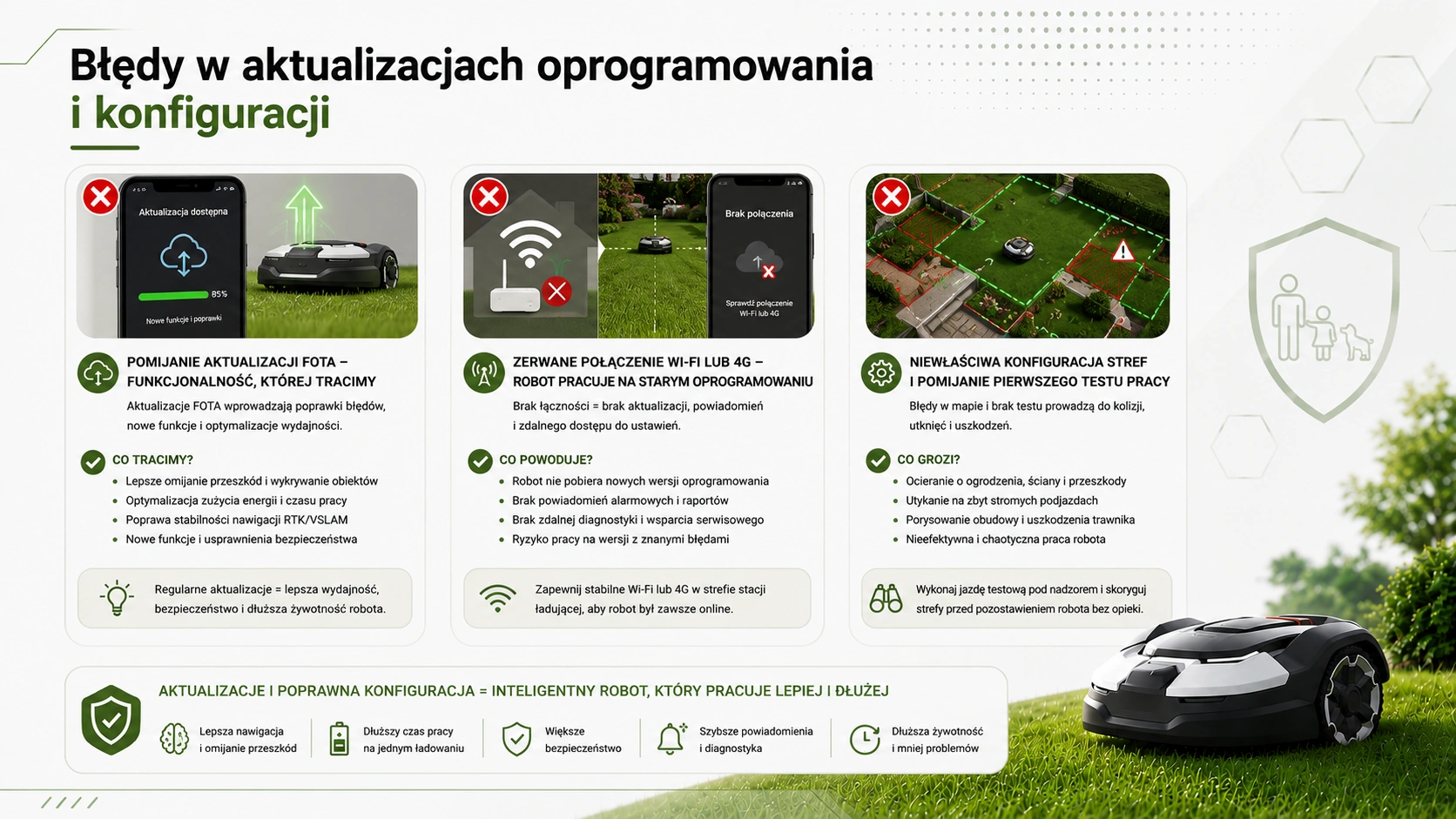
Errors in software updates and configuration
Modern robotic lawn mowers are evolving alongside successive system updates provided by the manufacturer's engineers.Ignoring this aspect is a technological step backward.
Skipping FOTA Updates – Features We Miss Out On
FOTA (Firmware Over The Air) updates introduce key improvements to obstacle-avoidance algorithms, optimize power consumption, and enhance navigation stability. Deliberately blocking updates means your robot is running on software that contains bugs the manufacturer fixed long ago.
Wi-Fi or 4G connection lost – the robot is running on outdated software
Many users set up the robot near their home and then send it out to distant areas of the garden where the home Wi-Fi network doesn't reach.A lack of connectivity prevents the machine from downloading updates and from sending alert notifications to the owner's smartphone.
Incorrect zone configuration and skipping the initial test run
Once the garden has been mapped, it is necessary to conduct a so-called test run under the user's supervision.This helps identify areas where the robot might scrape against the fence or get stuck on slopes that are too steep.Failing to perform this test often results in scratches on the new housing on the very first day of operation.
Mistakes Made Between Seasons—in Spring, Fall, and Winter
Transitional seasons and winter are critical times for the longevity of lithium-ion batteries and electronic seals.
- Leaving the robot out in the cold.Leaving the machine in an inactive charging station for the entire winter is the most serious mistake you can make when operating a robotic lawn mower.Freezing temperatures, moisture, and voltage drop in unused cells irreversibly damage the battery’s chemical structure.(For a detailed analysis of battery aging processes and the physics of water vapor condensation inside the casing, see our article on protecting the battery and electronics).
- Storing a battery charged to 100%.Storing the robot for the winter with a fully charged battery generates high internal voltage in the cells, accelerating their calendar aging..The optimal charge level for winter storage is 40–60% charge.
- Loss of Warranty Due to Lack of Maintenance.Please note that the Cedrus extended warranty is valid for 36 months requires an annual, authorized winter inspection.Failure to follow this procedure permanently voids the manufacturer's additional warranty..
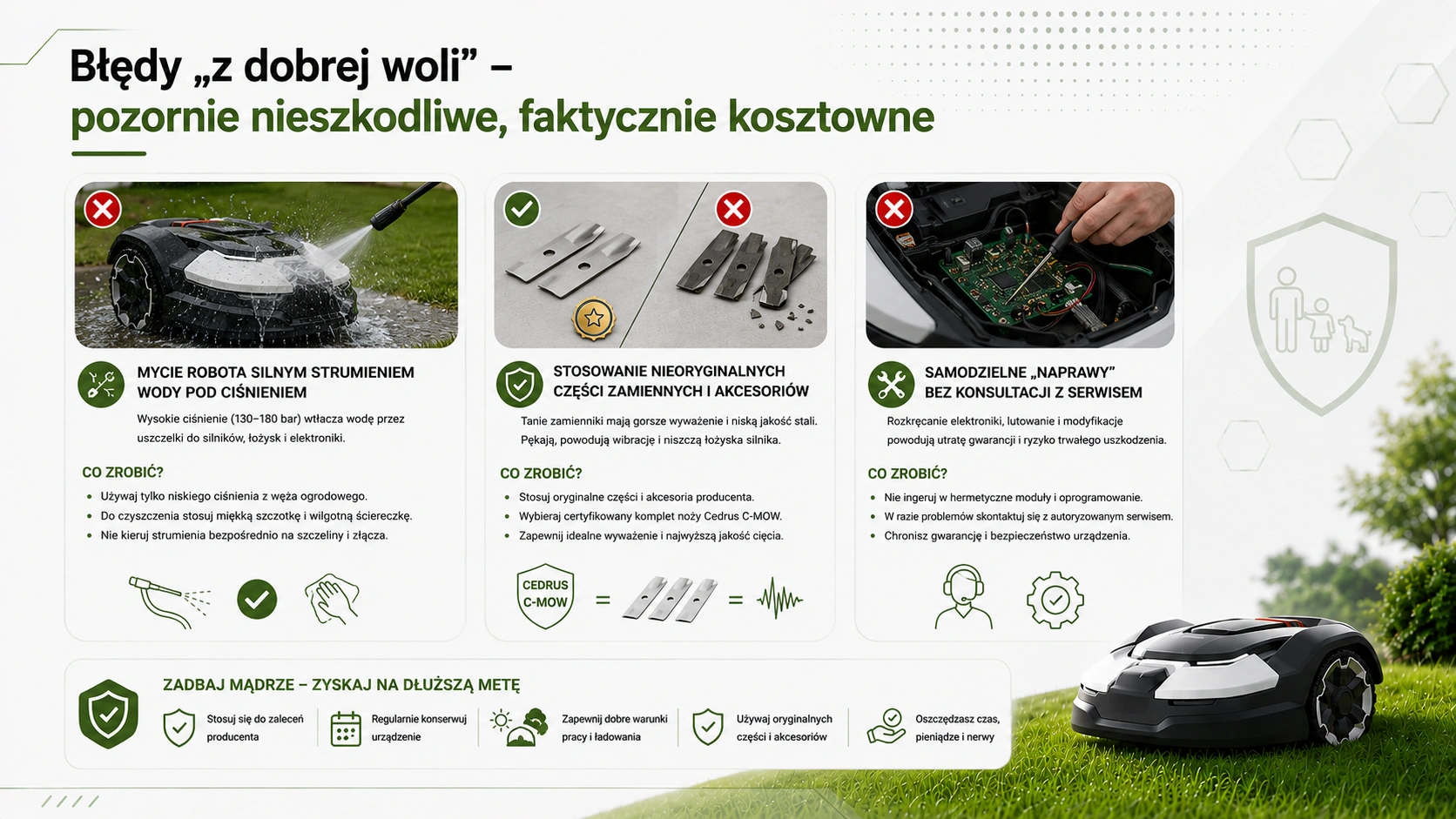
"Innocent" mistakes—seemingly harmless, but actually costly
Failures often occur when a user attempts to maintain the equipment but uses unauthorized methods.
Washing the robot with a strong jet of pressurized water
Although the IPX5 rating allows you to wash the chassis with water from a garden hose, using a professional pressure washer is the easiest way to damage the device.A concentrated stream of water at a pressure of 130–180 bar easily penetrates the rubber lip seals, forcing moisture directly into the motors, bearing covers, and the sealed chamber of the motherboard. Instead, use only a soft brush, a damp cloth, and low-pressure water for cleaning.
Use of non-genuine replacement parts and accessories
Buying cheap, non-genuine replacement cutting blades on auction sites is only a false economy.These replacements often have a different weight, are less well-balanced, and are made of brittle steel.
If it hits a rock, a non-genuine blade can break and get stuck in the turf, posing a danger to household members.What's more, the lack of balance generates powerful vibrations that quickly destroy the cutting motor's bearings.Always choose a certified, safe set of Cedrus C-MOW blades , which guarantees perfect balance and the highest cutting quality (you can read more about proper replacement and technical guidelines in the dedicated article on blade maintenance).
Do-it-yourself "repairs" without consulting a service center
Opening hermetically sealed electronic modules, attempting to solder damaged wiring harnesses on your own, or modifying the factory software will result in the immediate voiding of the warranty and pose a risk of irreversible damage to the electronics.
Using your robotic lawn mower correctly guarantees a beautiful, lush lawn and peace of mind for many seasons to come.If you want to give your machine the best protection, visit the Ewimax online store.As an official and authorized distributor, we offer a complete support ecosystem: from state-of-the-art Sunseeker robots, to genuine consumables, to professional winter maintenance services that will help you maintain the full 36-month manufacturer’s warranty.Let the professionals take care of your equipment and say goodbye to breakdowns!
Recommended

SUNSEEKER CEDRUS ORION X7 BY SUNSEEKER RTK C-MOW X7 AUTOMATIC MOWING ROBOT FOR 3000m2 - OFFICIAL DISTRIBUTOR - AUTHORIZED DEALER CEDRUS
SUNSEEKER X7 PLUS Gen 2 RTK ELITE AUTOMATIC MOWING ROBOT CEDRUS X7 PLUS Gen 2 RTK FOR CEDRUS C-MOW X7 PLUS Gen 2 6000m2 WIRELESS / WIRELESS - OFFICIAL DISTRIBUTOR - AUTHORIZED SUNSEEKER DEALER
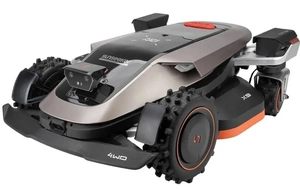
SUNSEEKER X9 Gen 2 RTK ELITE ROBOTIC LAWN MOWER CEDRUS X9 Gen 2 RTK AUTOMATIC LAWN MOWER CEDRUS C-MOW X9 Gen 2 12,000 m² WIRELESS / CORDLESS - OFFICIAL DISTRIBUTOR - AUTHORIZED SUNSEEKER DEALER